When to Switch from Excel to Inventory Software: What We Learned After a Spreadsheet Lost Real Data
For business owners tracking stock in a shared spreadsheet — the actual warning sign it's time for something else, not just how big the business has grown.
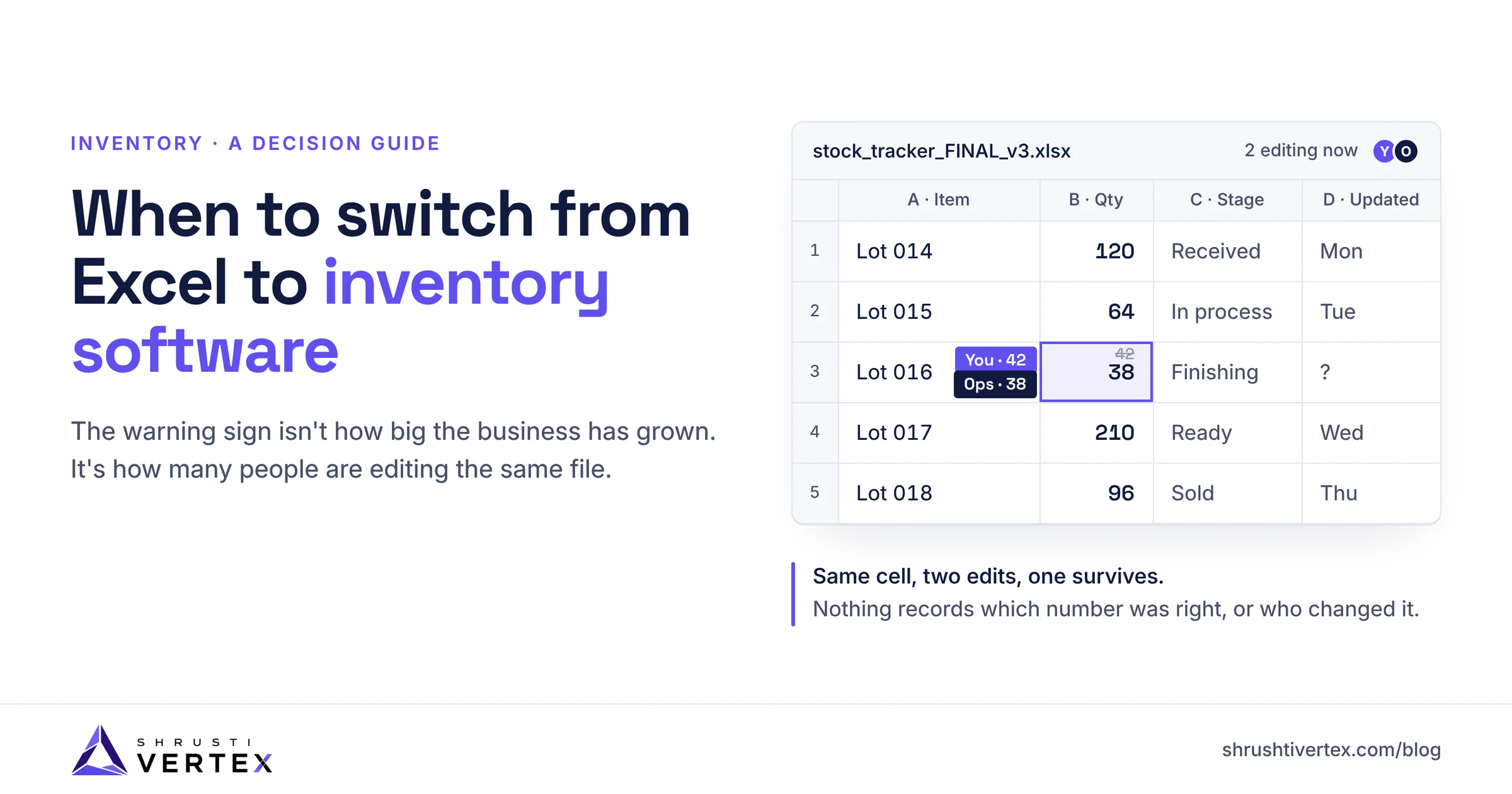
Someone in your business opens the shared inventory spreadsheet, changes a few numbers, and hits save. Somewhere else, almost the same moment, someone else does the same thing. One of those changes disappears — not moved, not flagged, just gone. Nobody notices until the totals stop adding up.
If that's already happened to you, the question isn't whether your business has "outgrown" a spreadsheet. It's whether the spreadsheet was ever built to survive this.
The real sign you need to switch from Excel to inventory software isn't company size or how many SKUs you carry — it's whether more than one person edits the same file. The moment two people can change the same data without either one knowing, you're one overwrite away from not being able to trust your own numbers.
Why This Keeps Happening
Excel and Google Sheets weren't built for two people to safely change the same cell at once. There's no lock that says "someone else is editing this row right now," no built-in record of who changed what, and no easy way to merge two people's edits when they collide. Most of the time nothing goes wrong — teams get lucky, or the overlap is small enough to fix by memory.
It's invisible right up until the day it isn't. And by the time it isn't, the damage is usually a stale number quietly feeding a real decision — a reorder, a quote, a payment — rather than an obvious error you'd catch on sight.
0%
of small and midsize businesses still track inventory manually (Capterra, 2026)
0%
rely on spreadsheets instead of dedicated software (Capterra, 2026)
0%
of buyers cite inefficiency as their top reason to finally switch (Capterra, 2026)
The Decision Rule: When to Actually Switch from Excel to Inventory Software
Not company size. Not stock count. Check these instead:
- More than one person regularly edits the same file
- You've ever had to guess which version of the numbers was correct
- You can't say who last changed a specific number, or when
- A wrong number has already affected a real decision — an order, a quote, a payment
- You keep an informal "just in case" backup copy, because you don't fully trust the live file
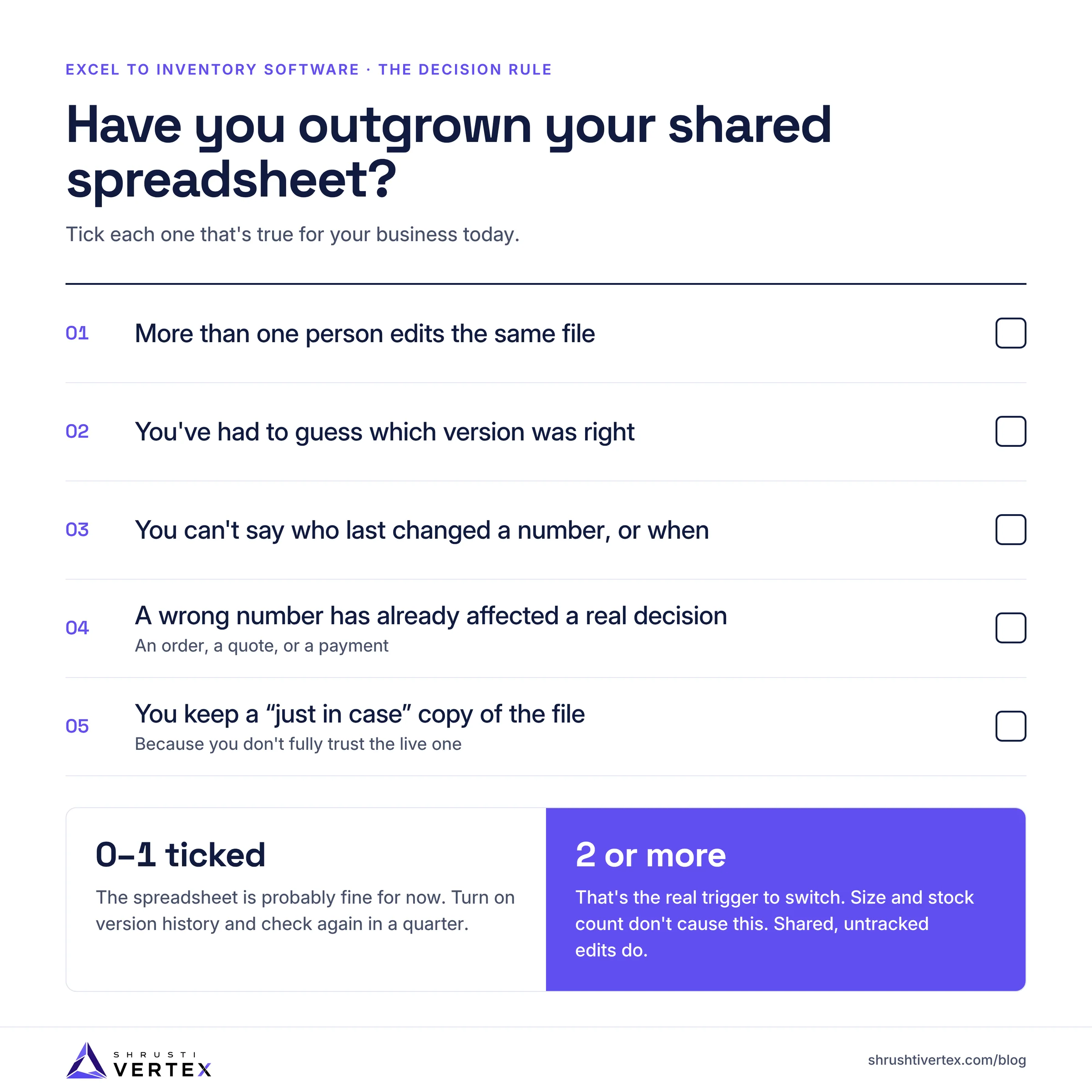
If two or more of these are true, that's the actual trigger. Revenue and team size don't cause this problem — concurrent, untracked editing does.
What This Looks Like in Practice
In one system we built, a business needed to track a raw item as it moved through several processing stages and became multiple finished units — each with its own cost and sale status. The spreadsheet they'd been using couldn't hold that shape safely once more than one person was updating it, and a lost update had already caused real confusion about what stock actually existed.
We replaced the shared file with a structured system: every change is tied to a specific person, a specific record, and a timestamp — not a whole file that anyone can silently overwrite. Two people can update different parts of the business at the same time without erasing each other's work. The owner can now see, at a glance, what's in progress and what's been sold, instead of reconstructing it from memory.
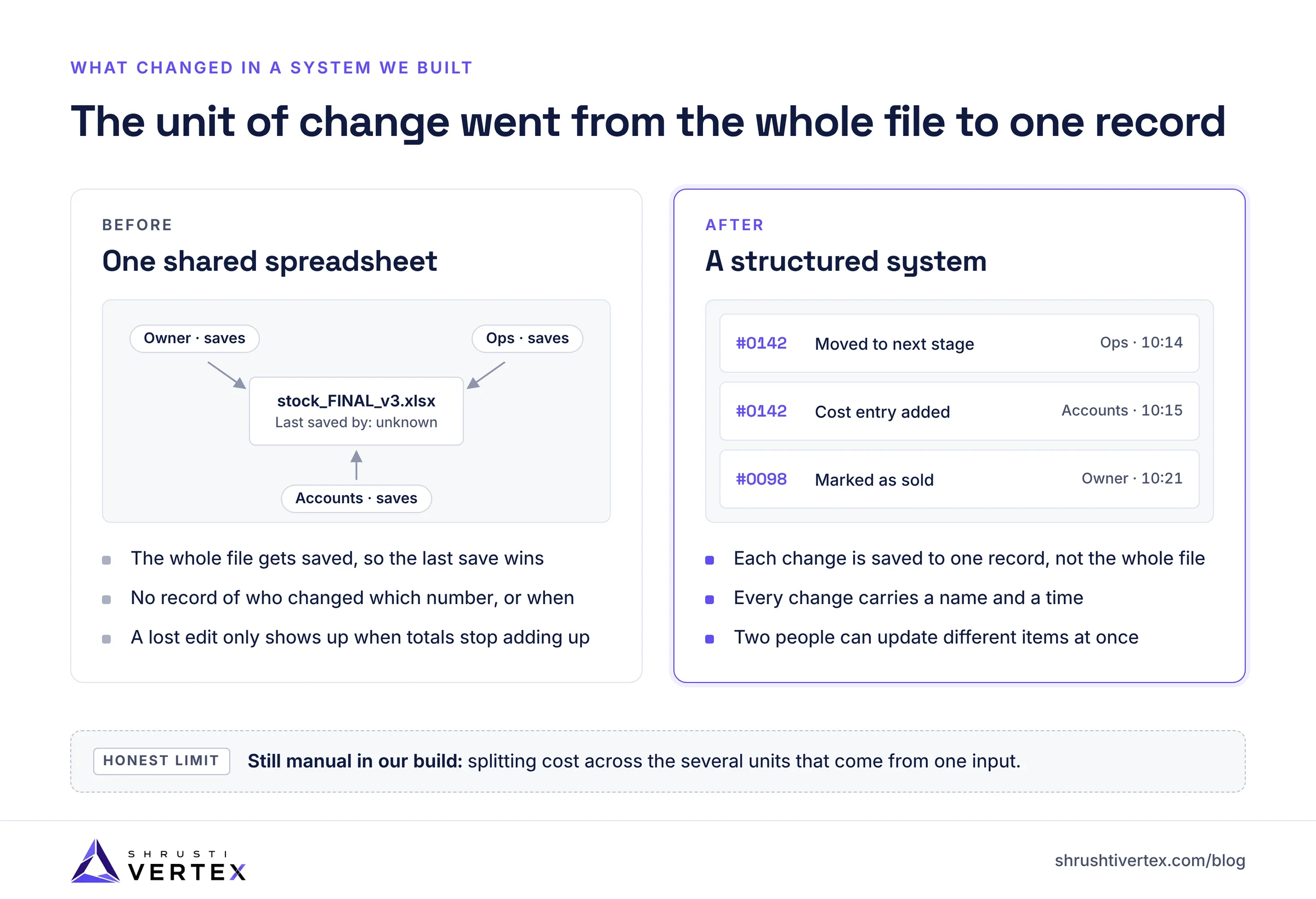
One thing it still doesn't do: automatically work out how cost should be split across the multiple finished units that come from a single raw item. That part is still done by hand, outside the system. We're not going to claim otherwise — it's a genuinely harder problem than the tracking itself, and we haven't solved it yet.
Related Service
Custom Web Applications
When stock doesn't fit a simple one-item-in, one-item-out model, we build the structured system that replaces the spreadsheet — with inventory logic that matches how your business actually operates.
The Real Cost of Switching — And What It Won't Fix
Switching off a spreadsheet isn't free, and it isn't instant. Historical data needs to be moved over, which takes real time if your records are messy. People who've built years of muscle memory around a spreadsheet need to unlearn habits, not just learn a new screen. And whether you build custom or buy something off-the-shelf, there's a real cost, upfront or ongoing.
What it doesn't automatically fix: calculation problems that were never really about the file format. If splitting cost across multiple outputs from one input was a judgment call before, it's often still a judgment call after — just inside a system that at least won't lose the underlying data while you make it.
There's also a quieter cost worth planning for: where the data lives once it's off a laptop. A spreadsheet's "backup" is usually a copy someone emailed themselves. A structured system needs an actual recovery plan — automated backups, and a clear answer for what happens if the server it runs on goes down for a day.
Related Service
Cloud & Infrastructure
The system is only as trustworthy as where it runs. We set up automated backups and a documented recovery plan so switching off the spreadsheet doesn't just move the data-loss risk somewhere less visible.
When This Isn't for You
If only one person ever touches the file, a version conflict isn't really possible — there's nothing to overwrite. If your stock is simple enough that a mistake would be obvious and low-stakes, the spreadsheet is probably still fine. And if you're early enough that the file doesn't yet reflect how the business actually runs day to day, switching now just moves the same informal process into a more expensive format.
Don't switch because a "real system" feels more legitimate. Switch because the specific failure above has already happened, or clearly will.
What to Do This Week
- Count how many people currently edit the live file. If it's more than one, you already have the precondition for this problem.
- Check whether version history is turned on. Google Sheets has it by default; Excel files usually need to be stored on SharePoint or OneDrive for it to work at all.
- Ask yourself honestly: could you say who changed a specific number last week, and when? If the answer is no, that's the actual answer to whether you've outgrown the spreadsheet.
The Bottom Line
A spreadsheet isn't a failure of ambition — it's just the wrong tool once more than one person depends on it being right. If you're not sure whether you've actually hit that point yet, walk us through how your team tracks stock today and we'll give you an honest answer.
A spreadsheet doesn't fail because your business got too big for it. It fails the moment two people are trusted to update the same file without either one knowing what the other changed.
Related Service
Not Sure If You've Outgrown the Spreadsheet?
Walk us through how your team tracks stock today. We'll tell you honestly whether you've hit the real trigger to switch — no proposal, no pressure.
Frequently Asked Questions
It has built-in version history, which helps you see what changed after the fact — but it still doesn't prevent two people's edits from colliding in the first place.
For most businesses, an off-the-shelf tool solves the overwrite problem fine. Custom is usually only worth it when your stock doesn't fit a simple one-item-in, one-item-out model.
It depends mostly on how much historical data needs to move and how many people need to unlearn old habits — a straightforward setup is realistically a few weeks, not a weekend.
Not automatically. It fixes who changed what, and when. Cost calculation across complex stock is usually a separate problem you'll still need to solve deliberately.
About the Author

Shrushtivertex
Shrushtivertex is a technology engineering company helping startups and enterprises build scalable cloud infrastructure, AI solutions, web applications, mobile apps, and blockchain platforms.
Newsletter
Stay Ahead of Technology
One practical engineering insight every month. No noise, no spam.
Related Articles
 Digital Transformation7 min read
Why Every Modern Business Needs a Technology Partner—Not Just a Software Development Company
The gap between a software vendor and a true technology partner is strategic, not technical. Here's why that distinction defines how fast your business grows in the next decade.
Read article Agentic AI8 min read
How to Use Agentic AI to Automate Your Business Operations — Where to Start
Most businesses are interested in AI automation — they just don't know where to start. This guide shows you how to find the right first workflow, make the financial case, and build confidence before you scale.
Read article Agentic AI10 min read
Agent Harness vs AI Agent: Why Your AI Build Fails in Production (And How to Fix It)
Your agent passed the demo. Three weeks into production it's marking tasks complete that aren't finished, losing context between sessions, and nobody can reproduce the failure — because the bug isn't in the agent. It's in what you built around it.
Read article